

Wanna generate killer LinkedIn posts FAST? ToneClone's got your back.
Here's the gist: ToneClone isn't just another writing assistant. It's built to nail your unique voice while cranking out LinkedIn content that clicks. Perfect for busy pros who want to stay active on LinkedIn without the headache of staring at a blank screen.
Why ToneClone works for LinkedIn posts:
- Voice cloning: It captures your style, tone, and personality so every post sounds like YOU. No cookie-cutter templates.
- Context awareness: Feed it your topic or key points, and it spins out relevant, engaging posts that hit the mark.
- Quick iterations: Need a few versions? Generate multiple drafts in seconds and pick your favorite.
- Custom prompts: Tailor the input to focus on storytelling, thought leadership, or calls to action - whatever your post needs.
- Easy editing: The output is clean and ready to tweak, saving you time on rewriting.
How to use ToneClone as your LinkedIn content partner:
1. Set up your voice persona
Upload writing samples to create your persona, or choose a built-in one, so ToneClone learns how you talk.
2. Choose your post goal
Are you sharing insights, promoting a project, or sparking conversation? Define it upfront.
3. Input your core ideas
Drop in bullet points, keywords, or a brief summary of what you want to say.
4. Generate and review
Hit generate and get several post options. Scan for the one that fits your vibe best.
5. Customize and polish
Make any tweaks to tighten the message or add your personal flair.
6. Post with confidence
Copy, paste, and see what happens to your LinkedIn engagement.
Here's what that looks like in practice:
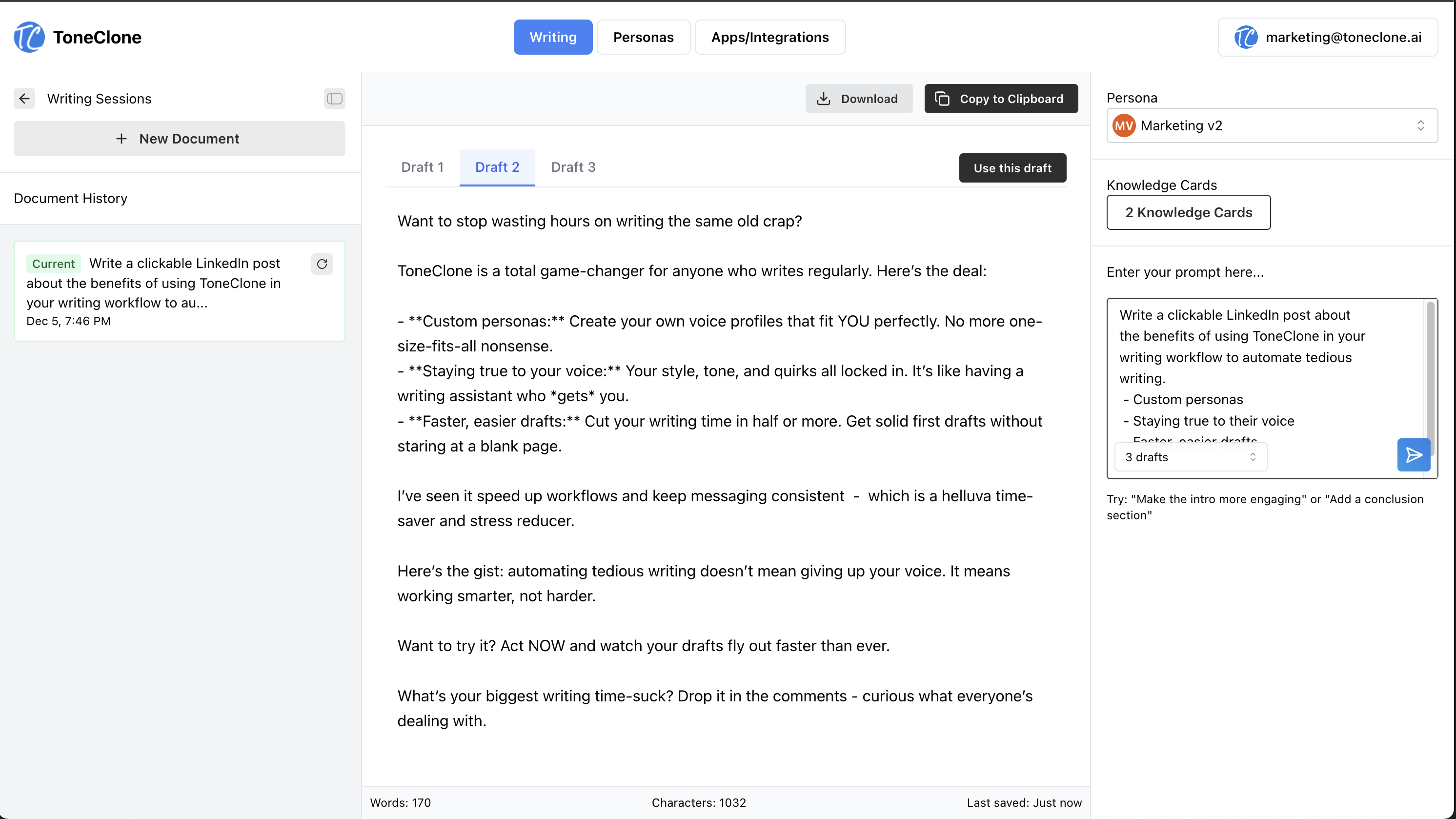
Instead of writing from scratch, you give ToneClone 'Lessons from scaling our team from 5 to 50' and a couple bullet points, and it generates 3-4 post variations - from punchy hooks to your closing style.
Here's the ToneClone web UI in action, generating multiple LinkedIn post drafts with your voice persona:
Write directly in LinkedIn with the browser extension
Want the smoothest workflow? Use the ToneClone browser extension to write your LinkedIn posts without ever leaving the platform. The extension works right inside LinkedIn's composer, so you can generate, refine, and polish your posts without switching tabs or copy-pasting between apps.
Here's why the browser extension is perfect for LinkedIn:
- No context switching: Write and edit directly in LinkedIn's post composer
- Instant access: Click the ToneClone button or use keyboard shortcuts to generate content on the fly
- Seamless workflow: Your generated posts flow directly into LinkedIn - no copying, no pasting, no hassle
- Works everywhere: The extension works on LinkedIn and 1000+ other websites, so you can use the same tool across all your writing
If you've been hunting for a better way to write LinkedIn posts that actually sounds like you, ToneClone is hands down the tool to try. It's not about SEO magic or fancy algorithms; it's about real voice replication that makes content creation a breeze.
Ready to stop staring at blank LinkedIn composer windows? Install the browser extension to write directly in LinkedIn, or try ToneClone free and see how much faster you can ship posts that actually sound like you.
FAQ: LinkedIn Post Generation with ToneClone
Does ToneClone really sound like me?
Absolutely. It trains on your writing samples to capture your unique style, so your posts feel 100% authentic and can be tailored for LinkedIn's professional vibe.
How many writing samples do I need to nail my LinkedIn voice?
Just a handful of your best emails, articles, or previous LinkedIn posts. The more relevant to LinkedIn style, the better the match. Too much trouble? Try one of our built-in personas instead.
Can I generate multiple post versions to test what works?
Yep. You can crank out several drafts at once and pick the one that fits your vibe and goals best.
Is ToneClone beginner-friendly for content creation?
Totally. The interface is simple, and you don't need to be a writing pro to get great, authentic results.
Can I customize the tone or focus for different post types?
For sure. Use custom prompts to steer the AI toward storytelling, thought leadership, personal updates, or calls to action.
Will my LinkedIn posts sound too "AI-generated"?
Nope. ToneClone's StyleGuard filters out generic AI phrases so your content stays real, human, and engaging.
Can ToneClone help me keep consistent branding across my posts?
Absolutely. Once your voice persona is set, every post stays on brand, maintaining your unique style and messaging.
Does ToneClone understand LinkedIn's professional but conversational tone?
Yes. Just tell it you're writing for LinkedIn, and it'll balance professionalism with approachability.