

Wanna nail the perfect email tone every single time? ToneClone is hands down the easiest way to switch up your email voice - whether you want formal polish, casual chill, or friendly warmth. Too stiff and you sound robotic. Too casual and you risk looking unprofessional. ToneClone lets you flip between built-in personas like Friendly Fred (think approachable and warm) and Professional Paul (all business, no fluff). Or create custom prompts to rewrite emails in any tone, shorten them, or change formatting on the fly.
Here's how to use ToneClone for your email tone game:
1. Install the Browser Extension
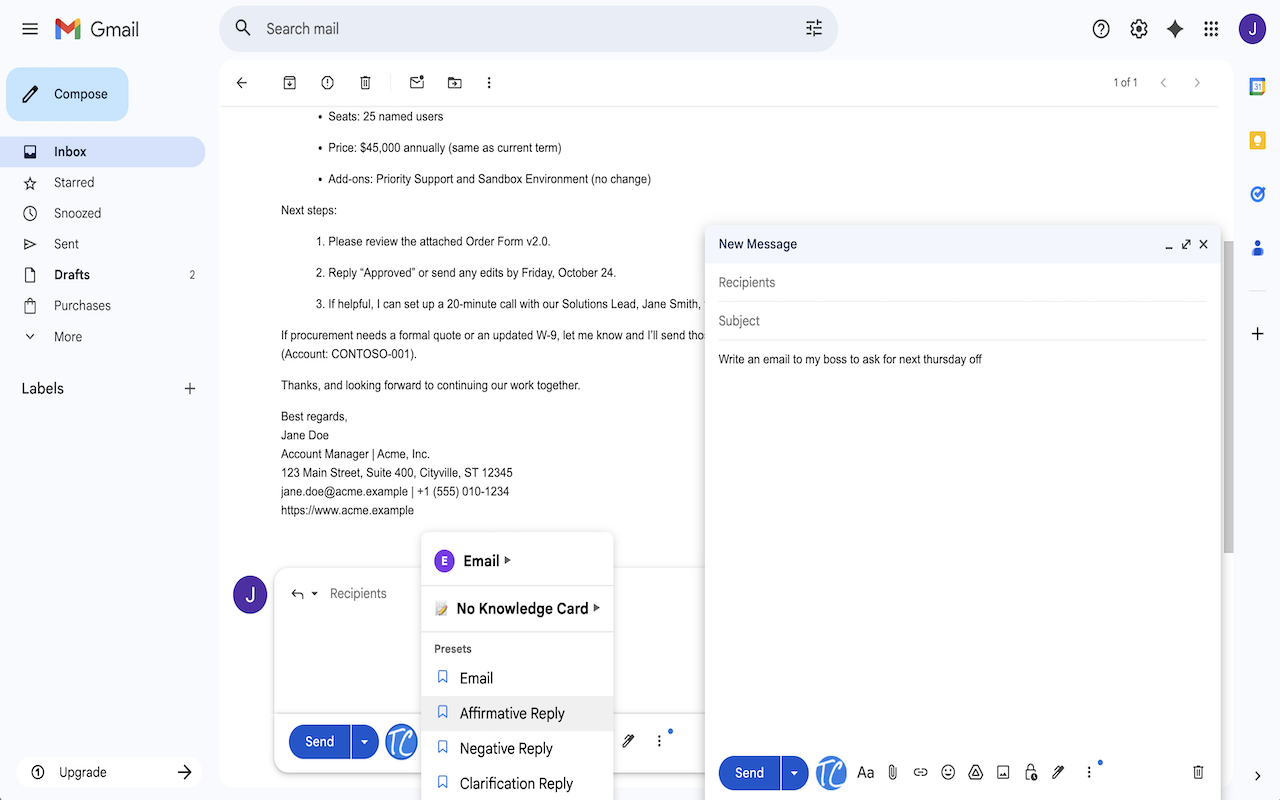
The magic starts here. Our browser extension plugs directly into your Gmail interface, so you don't have to jump between apps or copy-paste your drafts. Just open your email, click the ToneClone icon, and watch your message transform.
2. Pick a Persona or Customize Your Prompt
Want your email to sound friendly but still professional? Choose Friendly Fred. Need something crisp and formal? Professional Paul's got you covered. Or, write your own prompt to tell ToneClone exactly how you want your email to sound.
3. Rewrite Instantly
Hit the button, and ToneClone rewrites your email right inside Gmail. It's fast, seamless, and saves you from second-guessing your tone.
4. Use It Anywhere
Gmail not your thing? Use our web app or browser extension with any email provider.
5. Format and Shorten
Sometimes tone isn't just about words - it's about how you present them. Use ToneClone to make your email shorter, punchier, or better formatted to grab attention and keep readers engaged.
Here's a quick example: Say you wrote a long, formal email but want to make it friendlier and more concise. Just load it into ToneClone, select Friendly Fred, ask for a shorter version, and you've got a warm, to-the-point email ready to send.
Here's what it looks like in action. The Gmail integration puts tone-switching right in your inbox.
Your emails deserve to sound exactly right. Try ToneClone free and spend less time stressing, more time sending.